注意
转到末尾以下载完整示例代码或通过 JupyterLite 或 Binder 在浏览器中运行此示例。
使用树集成进行特征转换#
将您的特征转换为更高维度的稀疏空间。然后对这些特征训练一个线性模型。
首先在训练集上拟合一个树集成(完全随机树、随机森林或梯度提升树)。然后,集成中每棵树的每个叶子都在一个新的特征空间中被分配一个固定的任意特征索引。接着,这些叶子索引以 one-hot 方式编码。
每个样本都会经过集成中每棵树的决策,最终落入每棵树的一个叶子中。通过将这些叶子的特征值设置为 1,并将其他特征值设置为 0 来对样本进行编码。
因此,得到的转换器学习到了数据的有监督、稀疏、高维分类嵌入。
# Authors: The scikit-learn developers
# SPDX-License-Identifier: BSD-3-Clause
首先,我们将创建一个大型数据集并将其分成三部分
一部分用于训练集成方法,这些方法随后被用作特征工程转换器;
一部分用于训练线性模型;
一部分用于测试线性模型。
以这种方式分割数据非常重要,以避免数据泄露导致的过拟合。
from sklearn.datasets import make_classification
from sklearn.model_selection import train_test_split

X, y = make_classification(n_samples=80_000, random_state=10)

X_full_train, X_test, y_full_train, y_test = train_test_split(
    X, y, test_size=0.5, random_state=10
)
X_train_ensemble, X_train_linear, y_train_ensemble, y_train_linear = train_test_split(
    X_full_train, y_full_train, test_size=0.5, random_state=10
)
对于每种集成方法,我们将使用 10 个估计器和最大深度为 3 层。
n_estimators = 10
max_depth = 3
首先,我们将在分离的训练集上开始训练随机森林和梯度提升
from sklearn.ensemble import GradientBoostingClassifier, RandomForestClassifier

random_forest = RandomForestClassifier(
    n_estimators=n_estimators, max_depth=max_depth, random_state=10
)
random_forest.fit(X_train_ensemble, y_train_ensemble)

gradient_boosting = GradientBoostingClassifier(
    n_estimators=n_estimators, max_depth=max_depth, random_state=10
)
_ = gradient_boosting.fit(X_train_ensemble, y_train_ensemble)
请注意,对于中等规模数据集(n_samples >= 10_000),HistGradientBoostingClassifier 比 GradientBoostingClassifier 快得多,但这并非本例的情况。
RandomTreesEmbedding 是一种无监督方法,因此不需要独立训练。
from sklearn.ensemble import RandomTreesEmbedding

random_tree_embedding = RandomTreesEmbedding(
    n_estimators=n_estimators, max_depth=max_depth, random_state=0
)
现在,我们将创建三个管道,它们将使用上述嵌入作为预处理阶段。
随机树嵌入可以直接与逻辑回归建立管道连接,因为它是一个标准的 scikit-learn 转换器。
from sklearn.linear_model import LogisticRegression
from sklearn.pipeline import make_pipeline

rt_model = make_pipeline(random_tree_embedding, LogisticRegression(max_iter=1000))
rt_model.fit(X_train_linear, y_train_linear)
Pipeline(steps=[('randomtreesembedding',
                 RandomTreesEmbedding(max_depth=3, n_estimators=10,
                                      random_state=0)),
                ('logisticregression', LogisticRegression(max_iter=1000))])
在 Jupyter 环境中,请重新运行此单元格以显示 HTML 表示形式或信任 notebook。在 GitHub 上,HTML 表示形式无法渲染,请尝试使用 nbviewer.org 加载此页面。
参数
参数
参数
然后,我们可以将随机森林或梯度提升与逻辑回归建立管道连接。然而,特征转换将通过调用方法 apply 发生。scikit-learn 中的管道期望调用 transform。因此,我们将对 apply 的调用包装在 FunctionTransformer 中。
from sklearn.preprocessing import FunctionTransformer, OneHotEncoder


def rf_apply(X, model):
    return model.apply(X)


rf_leaves_yielder = FunctionTransformer(rf_apply, kw_args={"model": random_forest})

rf_model = make_pipeline(
    rf_leaves_yielder,
    OneHotEncoder(handle_unknown="ignore"),
    LogisticRegression(max_iter=1000),
)
rf_model.fit(X_train_linear, y_train_linear)
Pipeline(steps=[('functiontransformer',
                 FunctionTransformer(func=<function rf_apply at 0x7fb4864dfce0>,
                                     kw_args={'model': RandomForestClassifier(max_depth=3,
                                                                              n_estimators=10,
                                                                              random_state=10)})),
                ('onehotencoder', OneHotEncoder(handle_unknown='ignore')),
                ('logisticregression', LogisticRegression(max_iter=1000))])
在 Jupyter 环境中,请重新运行此单元格以显示 HTML 表示形式或信任 notebook。在 GitHub 上,HTML 表示形式无法渲染,请尝试使用 nbviewer.org 加载此页面。
参数
参数
参数
参数
def gbdt_apply(X, model):
    return model.apply(X)[:, :, 0]


gbdt_leaves_yielder = FunctionTransformer(
    gbdt_apply, kw_args={"model": gradient_boosting}
)

gbdt_model = make_pipeline(
    gbdt_leaves_yielder,
    OneHotEncoder(handle_unknown="ignore"),
    LogisticRegression(max_iter=1000),
)
gbdt_model.fit(X_train_linear, y_train_linear)
Pipeline(steps=[('functiontransformer',
                 FunctionTransformer(func=<function gbdt_apply at 0x7fb4864dd800>,
                                     kw_args={'model': GradientBoostingClassifier(n_estimators=10,
                                                                                  random_state=10)})),
                ('onehotencoder', OneHotEncoder(handle_unknown='ignore')),
                ('logisticregression', LogisticRegression(max_iter=1000))])
在 Jupyter 环境中,请重新运行此单元格以显示 HTML 表示形式或信任 notebook。在 GitHub 上,HTML 表示形式无法渲染,请尝试使用 nbviewer.org 加载此页面。
参数
参数
参数
参数
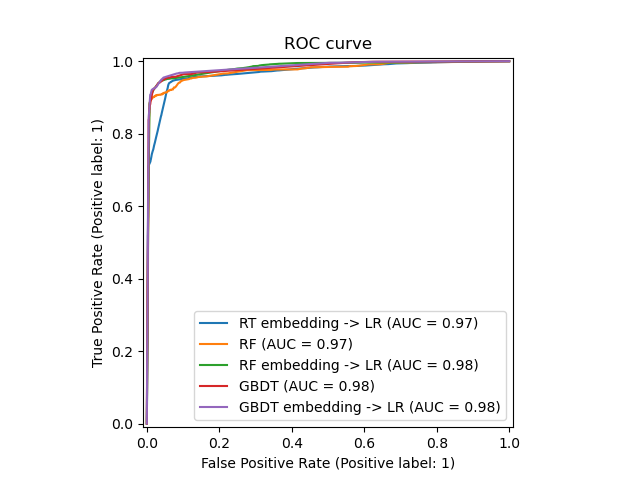
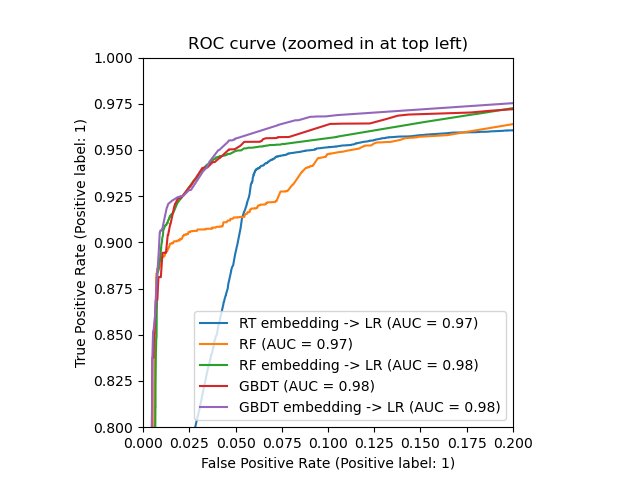
我们最终可以展示所有模型的不同 ROC 曲线。
import matplotlib.pyplot as plt

from sklearn.metrics import RocCurveDisplay

_, ax = plt.subplots()

models = [
    ("RT embedding -> LR", rt_model),
    ("RF", random_forest),
    ("RF embedding -> LR", rf_model),
    ("GBDT", gradient_boosting),
    ("GBDT embedding -> LR", gbdt_model),
]

model_displays = {}
for name, pipeline in models:
    model_displays[name] = RocCurveDisplay.from_estimator(
        pipeline, X_test, y_test, ax=ax, name=name
    )
_ = ax.set_title("ROC curve")
_, ax = plt.subplots()
for name, pipeline in models:
    model_displays[name].plot(ax=ax)

ax.set_xlim(0, 0.2)
ax.set_ylim(0.8, 1)
_ = ax.set_title("ROC curve (zoomed in at top left)")
脚本总运行时间: (0 minutes 2.026 seconds)


相关示例