ValidationCurveDisplay#
- class sklearn.model_selection.ValidationCurveDisplay(*, param_name, param_range, train_scores, test_scores, score_name=None)[source]#
验证曲线可视化。
建议使用
from_estimator来创建ValidationCurveDisplay实例。所有参数都存储为属性。有关可视化 API 的一般信息,请阅读 用户指南,有关验证曲线可视化的详细文档,请参阅 详细文档。
在版本 1.3 中新增。
- 参数:
- param_namestr
已更改的参数的名称。
- param_rangearray-like of shape (n_ticks,)
已评估的参数值。
- train_scoresndarray of shape (n_ticks, n_cv_folds)
训练集上的得分。
- test_scoresndarray of shape (n_ticks, n_cv_folds)
测试集上的得分。
- score_namestr, default=None
在
validation_curve中使用的分数的名称。它将覆盖从scoring参数推断出的名称。如果score为None,则当negate_score为False时,我们使用"Score",否则使用"Negative score"。如果scoring是字符串或可调用对象,我们会推断名称。我们用空格替换_,并大写首字母。我们删除neg_,并在negate_score为False时将其替换为"Negative",否则仅将其删除。
- 属性:
- ax_matplotlib Axes
带有验证曲线的轴。
- figure_matplotlib Figure
包含验证曲线的图形。
- errorbar_list of matplotlib Artist or None
当
std_display_style为"errorbar"时,这是一个matplotlib.container.ErrorbarContainer对象的列表。如果使用了其他样式,则errorbar_为None。- lines_list of matplotlib Artist or None
当
std_display_style为"fill_between"时,这是一个对应于平均训练和测试分数的matplotlib.lines.Line2D对象的列表。如果使用了其他样式,则line_为None。- fill_between_list of matplotlib Artist or None
当
std_display_style为"fill_between"时,这是一个matplotlib.collections.PolyCollection对象的列表。如果使用了其他样式,则fill_between_为None。
另请参阅
示例
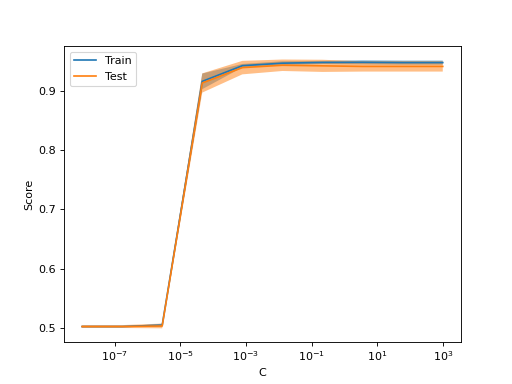
>>> import numpy as np
>>> import matplotlib.pyplot as plt
>>> from sklearn.datasets import make_classification
>>> from sklearn.model_selection import ValidationCurveDisplay, validation_curve
>>> from sklearn.linear_model import LogisticRegression
>>> X, y = make_classification(n_samples=1_000, random_state=0)
>>> logistic_regression = LogisticRegression()
>>> param_name, param_range = "C", np.logspace(-8, 3, 10)
>>> train_scores, test_scores = validation_curve(
...     logistic_regression, X, y, param_name=param_name, param_range=param_range
... )
>>> display = ValidationCurveDisplay(
...     param_name=param_name, param_range=param_range,
...     train_scores=train_scores, test_scores=test_scores, score_name="Score"
... )
>>> display.plot()
<...>
>>> plt.show()
- classmethod from_estimator(estimator, X, y, *, param_name, param_range, groups=None, cv=None, scoring=None, n_jobs=None, pre_dispatch='all', verbose=0, error_score=nan, fit_params=None, ax=None, negate_score=False, score_name=None, score_type='both', std_display_style='fill_between', line_kw=None, fill_between_kw=None, errorbar_kw=None)[source]#
从估计器创建验证曲线显示。
有关可视化 API 的一般信息,请阅读 用户指南,有关验证曲线可视化的详细文档,请参阅 详细文档。
- 参数:
- estimator实现了“fit”和“predict”方法的对象类型
此类型的一个对象,为每次验证进行克隆。
- Xshape 为 (n_samples, n_features) 的 array-like
训练数据,其中
n_samples是样本数,n_features是特征数。- y形状为 (n_samples,) 或 (n_samples, n_outputs) 的类似数组或 None
相对于 X 的分类或回归目标;对于无监督学习为 None。
- param_namestr
将要变化的参数的名称。
- param_rangearray-like of shape (n_values,)
将要评估的参数值。
- groups形状为 (n_samples,) 的类数组对象,默认=None
在将数据集拆分为训练/测试集时使用的样本组标签。仅与“Group”cv 实例(例如
GroupKFold)结合使用。- cvint, cross-validation generator or an iterable, default=None
确定交叉验证拆分策略。cv 的可能输入包括
None,使用默认的 5 折交叉验证,
int,指定
(Stratified)KFold中的折叠数,一个可迭代对象,产生索引数组形式的 (训练集, 测试集) 拆分。
对于 int/None 输入,如果估计器是分类器且
y是二元或多类别,则使用StratifiedKFold。在所有其他情况下,使用KFold。这些分割器以shuffle=False实例化,因此分割在不同调用中将相同。有关此处可使用的各种交叉验证策略,请参阅 用户指南。
- scoringstr 或可调用对象,默认=None
计算验证曲线时使用的评分方法。选项
str: 有关选项,请参阅 String name scorers。
callable: 带有签名
scorer(estimator, X, y)的可调用评分器对象(例如函数)。有关详细信息,请参阅 Callable scorers。None:使用estimator的 默认评估标准。
- n_jobsint, default=None
并行运行的作业数。估计器的训练和得分计算在不同的训练集和测试集上并行化。
None表示 1,除非在joblib.parallel_backend上下文中。-1表示使用所有处理器。有关详细信息,请参阅词汇表。- pre_dispatchint or str, default=’all’
并行执行的预调度作业数(默认为全部)。该选项可以减少分配的内存。该字符串可以是像“2*n_jobs”这样的表达式。
- verboseint, default=0
控制详细程度:值越高,消息越多。
- error_score‘raise’ or numeric, default=np.nan
如果估计器拟合中发生错误,分配给分数的值。如果设置为 'raise',则会引发错误。如果给定一个数值,则会引发 FitFailedWarning。
- fit_paramsdict, default=None
传递给估计器 fit 方法的参数。
- axmatplotlib Axes, default=None
用于绘图的坐标轴对象。如果为
None,则会创建新的图和坐标轴。- negate_scorebool, default=False
是否否定通过
validation_curve获得的得分。这在scikit-learn中使用错误(以neg_*表示)时特别有用。- score_namestr, default=None
用于装饰绘图 y 轴的得分名称。它将覆盖从
scoring参数推断出的名称。如果score为None,则当negate_score为False时,我们使用"Score",否则使用"Negative score"。如果scoring是字符串或可调用对象,我们会推断名称。我们用空格替换_,并大写首字母。我们删除neg_,并在negate_score为False时将其替换为"Negative",否则仅将其删除。- score_type{“test”, “train”, “both”}, default=”both”
要绘制的分数类型。可以是
"test"、"train"或"both"之一。- std_display_style{“errorbar”, “fill_between”} or None, default=”fill_between”
用于在平均分数周围显示分数标准差的样式。如果为
None,则不显示标准差的表示。- line_kwdict, 默认=None
传递给用于绘制平均分数的
plt.plot的其他关键字参数。- fill_between_kwdict, default=None
传递给用于绘制分数标准差的
plt.fill_between的其他关键字参数。- errorbar_kwdict, default=None
传递给用于绘制平均分数和标准差分数的
plt.errorbar的其他关键字参数。
- 返回:
- display
ValidationCurveDisplay 存储计算值的对象。
- display
示例
>>> import numpy as np
>>> import matplotlib.pyplot as plt
>>> from sklearn.datasets import make_classification
>>> from sklearn.model_selection import ValidationCurveDisplay
>>> from sklearn.linear_model import LogisticRegression
>>> X, y = make_classification(n_samples=1_000, random_state=0)
>>> logistic_regression = LogisticRegression()
>>> param_name, param_range = "C", np.logspace(-8, 3, 10)
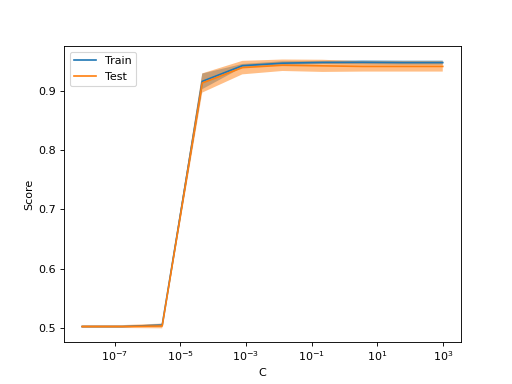
>>> ValidationCurveDisplay.from_estimator(
...     logistic_regression, X, y, param_name=param_name,
...     param_range=param_range,
... )
<...>
>>> plt.show()
- plot(ax=None, *, negate_score=False, score_name=None, score_type='both', std_display_style='fill_between', line_kw=None, fill_between_kw=None, errorbar_kw=None)[source]#
绘制可视化图。
- 参数:
- axmatplotlib Axes, default=None
用于绘图的坐标轴对象。如果为
None,则会创建新的图和坐标轴。- negate_scorebool, default=False
是否否定通过
validation_curve获得的得分。这在scikit-learn中使用错误(以neg_*表示)时特别有用。- score_namestr, default=None
用于装饰绘图 y 轴的得分名称。它将覆盖从
scoring参数推断出的名称。如果score为None,则当negate_score为False时,我们使用"Score",否则使用"Negative score"。如果scoring是字符串或可调用对象,我们会推断名称。我们用空格替换_,并大写首字母。我们删除neg_,并在negate_score为False时将其替换为"Negative",否则仅将其删除。- score_type{“test”, “train”, “both”}, default=”both”
要绘制的分数类型。可以是
"test"、"train"或"both"之一。- std_display_style{“errorbar”, “fill_between”} or None, default=”fill_between”
用于在平均分数周围显示分数标准差的样式。如果为 None,则不显示标准差的表示。
- line_kwdict, 默认=None
传递给用于绘制平均分数的
plt.plot的其他关键字参数。- fill_between_kwdict, default=None
传递给用于绘制分数标准差的
plt.fill_between的其他关键字参数。- errorbar_kwdict, default=None
传递给用于绘制平均分数和标准差分数的
plt.errorbar的其他关键字参数。
- 返回:
- display
ValidationCurveDisplay 存储计算值的对象。
- display