ConfusionMatrixDisplay#
- class sklearn.metrics.ConfusionMatrixDisplay(confusion_matrix, *, display_labels=None)[source]#
混淆矩阵可视化。
建议使用
from_estimator或from_predictions来创建ConfusionMatrixDisplay。所有参数都作为属性存储。有关
scikit-learn可视化工具的一般信息,请参阅 可视化指南。有关解释这些图表的指导,请参阅 模型评估指南。- 参数:
- confusion_matrixndarray of shape (n_classes, n_classes)
混淆矩阵。
- display_labelsndarray of shape (n_classes,), default=None
图表的显示标签。如果为 None,则显示标签设置为从 0 到
n_classes - 1。
- 属性:
- im_matplotlib AxesImage
表示混淆矩阵的图像。
- text_ndarray of shape (n_classes, n_classes), dtype=matplotlib Text, or None
matplotlib axes 数组。如果
include_values为 false,则为None。- ax_matplotlib Axes
包含混淆矩阵的 Axes。
- figure_matplotlib Figure
包含混淆矩阵的 Figure。
另请参阅
confusion_matrix计算混淆矩阵以评估分类的准确性。
ConfusionMatrixDisplay.from_estimator给定估计器、数据和标签,绘制混淆矩阵。
ConfusionMatrixDisplay.from_predictions给定真实标签和预测标签,绘制混淆矩阵。
示例
>>> import matplotlib.pyplot as plt
>>> from sklearn.datasets import make_classification
>>> from sklearn.metrics import confusion_matrix, ConfusionMatrixDisplay
>>> from sklearn.model_selection import train_test_split
>>> from sklearn.svm import SVC
>>> X, y = make_classification(random_state=0)
>>> X_train, X_test, y_train, y_test = train_test_split(X, y,
...                                                     random_state=0)
>>> clf = SVC(random_state=0)
>>> clf.fit(X_train, y_train)
SVC(random_state=0)
>>> predictions = clf.predict(X_test)
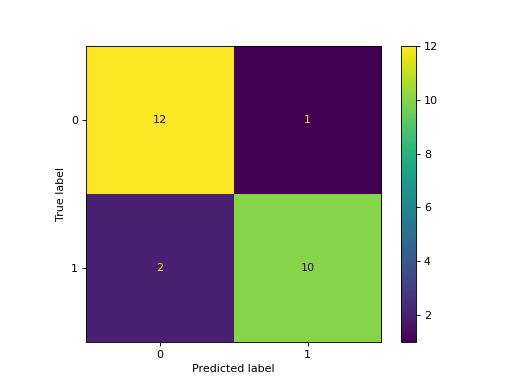
>>> cm = confusion_matrix(y_test, predictions, labels=clf.classes_)
>>> disp = ConfusionMatrixDisplay(confusion_matrix=cm,
...                               display_labels=clf.classes_)
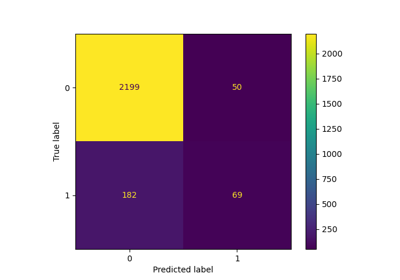
>>> disp.plot()
<...>
>>> plt.show()
- classmethod from_estimator(estimator, X, y, *, labels=None, sample_weight=None, normalize=None, display_labels=None, include_values=True, xticks_rotation='horizontal', values_format=None, cmap='viridis', ax=None, colorbar=True, im_kw=None, text_kw=None)[source]#
给定估计器和一些数据来绘制混淆矩阵。
有关
scikit-learn可视化工具的一般信息,请参阅 可视化指南。有关解释这些图表的指导,请参阅 模型评估指南。1.0 版本新增。
- 参数:
- estimatorestimator instance
已拟合的分类器或已拟合的
Pipeline,其中最后一个估计器是分类器。- Xshape 为 (n_samples, n_features) 的 {array-like, sparse matrix}
输入值。
- yarray-like of shape (n_samples,)
目标值。
- labels形状为 (n_classes,) 的类数组对象, 默认为 None
用于索引混淆矩阵的标签列表。这可用于重新排序或选择标签子集。如果给定
None,则使用至少在y_true或y_pred中出现一次的标签,并按排序顺序排列。- sample_weightshape 为 (n_samples,) 的 array-like, default=None
样本权重。
- normalize{‘true’, ‘pred’, ‘all’}, default=None
是否对矩阵中显示的计数进行归一化
如果为
'true',则混淆矩阵按真实条件(例如行)进行归一化;如果为
'pred',则混淆矩阵按预测条件(例如列)进行归一化;如果为
'all',则混淆矩阵按样本总数进行归一化;如果为
None(默认值),则混淆矩阵将不进行归一化。
- display_labelsarray-like of shape (n_classes,), default=None
用于绘图的目标名称。默认情况下,如果定义了
labels,则使用labels,否则使用y_true和y_pred的唯一标签。- include_valuesbool, default=True
在混淆矩阵中包含值。
- xticks_rotation{‘vertical’, ‘horizontal’} or float, default=’horizontal’
xticks 标签的旋转角度。
- values_formatstr, default=None
混淆矩阵中值的格式规范。如果为
None,则格式规范为 ‘d’ 或 ‘.2g’,取其中较短者。- cmapstr or matplotlib Colormap, default=’viridis’
matplotlib 识别的颜色图。
- axmatplotlib Axes, default=None
用于绘图的坐标轴对象。如果为
None,则会创建新的图和坐标轴。- colorbarbool, default=True
是否向图表添加颜色条。
- im_kwdict, default=None
传递给
matplotlib.pyplot.imshow调用的关键字字典。- text_kwdict, default=None
传递给
matplotlib.pyplot.text调用的关键字字典。1.2 版本新增。
- 返回:
- display
ConfusionMatrixDisplay
- display
另请参阅
ConfusionMatrixDisplay.from_predictions给定真实标签和预测标签,绘制混淆矩阵。
示例
>>> import matplotlib.pyplot as plt
>>> from sklearn.datasets import make_classification
>>> from sklearn.metrics import ConfusionMatrixDisplay
>>> from sklearn.model_selection import train_test_split
>>> from sklearn.svm import SVC
>>> X, y = make_classification(random_state=0)
>>> X_train, X_test, y_train, y_test = train_test_split(
...         X, y, random_state=0)
>>> clf = SVC(random_state=0)
>>> clf.fit(X_train, y_train)
SVC(random_state=0)
>>> ConfusionMatrixDisplay.from_estimator(
...     clf, X_test, y_test)
<...>
>>> plt.show()
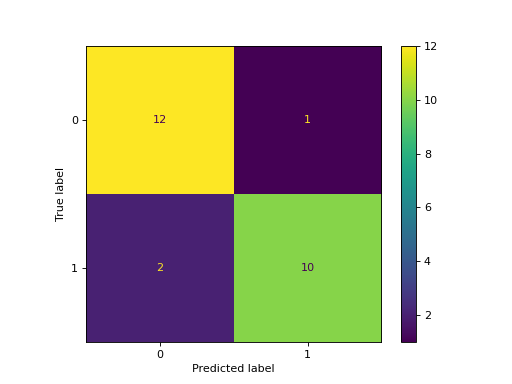
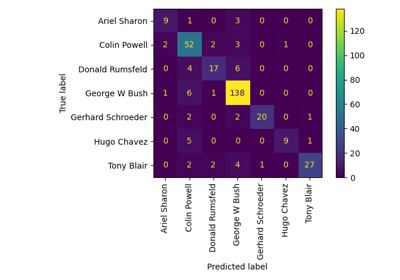
有关使用混淆矩阵评估支持向量分类器的详细示例,请参阅 使用混淆矩阵评估分类器性能
- classmethod from_predictions(y_true, y_pred, *, labels=None, sample_weight=None, normalize=None, display_labels=None, include_values=True, xticks_rotation='horizontal', values_format=None, cmap='viridis', ax=None, colorbar=True, im_kw=None, text_kw=None)[source]#
给定真实标签和预测标签来绘制混淆矩阵。
有关
scikit-learn可视化工具的一般信息,请参阅 可视化指南。有关解释这些图表的指导,请参阅 模型评估指南。1.0 版本新增。
- 参数:
- y_true形状为 (n_samples,) 的 array-like
真实标签。
- y_pred形状为 (n_samples,) 的类数组
由分类器的
predict方法给出的预测标签。- labels形状为 (n_classes,) 的类数组对象, 默认为 None
用于索引混淆矩阵的标签列表。这可用于重新排序或选择标签子集。如果给定
None,则使用至少在y_true或y_pred中出现一次的标签,并按排序顺序排列。- sample_weightshape 为 (n_samples,) 的 array-like, default=None
样本权重。
- normalize{‘true’, ‘pred’, ‘all’}, default=None
是否对矩阵中显示的计数进行归一化
如果为
'true',则混淆矩阵按真实条件(例如行)进行归一化;如果为
'pred',则混淆矩阵按预测条件(例如列)进行归一化;如果为
'all',则混淆矩阵按样本总数进行归一化;如果为
None(默认值),则混淆矩阵将不进行归一化。
- display_labelsarray-like of shape (n_classes,), default=None
用于绘图的目标名称。默认情况下,如果定义了
labels,则使用labels,否则使用y_true和y_pred的唯一标签。- include_valuesbool, default=True
在混淆矩阵中包含值。
- xticks_rotation{‘vertical’, ‘horizontal’} or float, default=’horizontal’
xticks 标签的旋转角度。
- values_formatstr, default=None
混淆矩阵中值的格式规范。如果为
None,则格式规范为 ‘d’ 或 ‘.2g’,取其中较短者。- cmapstr or matplotlib Colormap, default=’viridis’
matplotlib 识别的颜色图。
- axmatplotlib Axes, default=None
用于绘图的坐标轴对象。如果为
None,则会创建新的图和坐标轴。- colorbarbool, default=True
是否向图表添加颜色条。
- im_kwdict, default=None
传递给
matplotlib.pyplot.imshow调用的关键字字典。- text_kwdict, default=None
传递给
matplotlib.pyplot.text调用的关键字字典。1.2 版本新增。
- 返回:
- display
ConfusionMatrixDisplay
- display
另请参阅
ConfusionMatrixDisplay.from_estimator给定估计器、数据和标签,绘制混淆矩阵。
示例
>>> import matplotlib.pyplot as plt
>>> from sklearn.datasets import make_classification
>>> from sklearn.metrics import ConfusionMatrixDisplay
>>> from sklearn.model_selection import train_test_split
>>> from sklearn.svm import SVC
>>> X, y = make_classification(random_state=0)
>>> X_train, X_test, y_train, y_test = train_test_split(
...         X, y, random_state=0)
>>> clf = SVC(random_state=0)
>>> clf.fit(X_train, y_train)
SVC(random_state=0)
>>> y_pred = clf.predict(X_test)
>>> ConfusionMatrixDisplay.from_predictions(
...    y_test, y_pred)
<...>
>>> plt.show()

- plot(*, include_values=True, cmap='viridis', xticks_rotation='horizontal', values_format=None, ax=None, colorbar=True, im_kw=None, text_kw=None)[source]#
绘制可视化图。
- 参数:
- include_valuesbool, default=True
在混淆矩阵中包含值。
- cmapstr or matplotlib Colormap, default=’viridis’
matplotlib 识别的颜色图。
- xticks_rotation{‘vertical’, ‘horizontal’} or float, default=’horizontal’
xticks 标签的旋转角度。
- values_formatstr, default=None
混淆矩阵中值的格式规范。如果为
None,则格式规范为 ‘d’ 或 ‘.2g’,取其中较短者。- axmatplotlib axes, default=None
用于绘图的坐标轴对象。如果为
None,则会创建新的图和坐标轴。- colorbarbool, default=True
是否向图表添加颜色条。
- im_kwdict, default=None
传递给
matplotlib.pyplot.imshow调用的关键字字典。- text_kwdict, default=None
传递给
matplotlib.pyplot.text调用的关键字字典。1.2 版本新增。
- 返回:
- display
ConfusionMatrixDisplay 返回一个
ConfusionMatrixDisplay实例,其中包含绘制混淆矩阵的所有信息。
- display